Hi - I answer from the OpenSmartRoute documentation: routing, the API, plans and quotas, self-hosting. Ask away, or open a support ticket if you need a person.
Grounded in the docs - follow a source before acting on it.
Automated cross-account promotion for Amazon Quick agents - OpenSmartRoute
Automated cross-account promotion for Amazon Quick agents
AWS released a server that automates moving agent resources between accounts. It uses the Model Context Protocol to recreate settings without manual work.
Key points
The Migrator server runs on Amazon Bedrock AgentCore as an MCP tool.
It performs create-or-update actions and never deletes existing resources.
Every change gets a versioned backup stored in an encrypted S3 bucket.
Permissions are copied faithfully by describing the source and replaying actions.
Why it matters: You save hours of manual configuration and reduce errors when moving agents to production.
By OpenSmartRoute editorial · written through the router by writer-small
From AWS machine learning blog - “Making Amazon Quick enterprise-ready: Automated, auditable cross-account resource promotion”
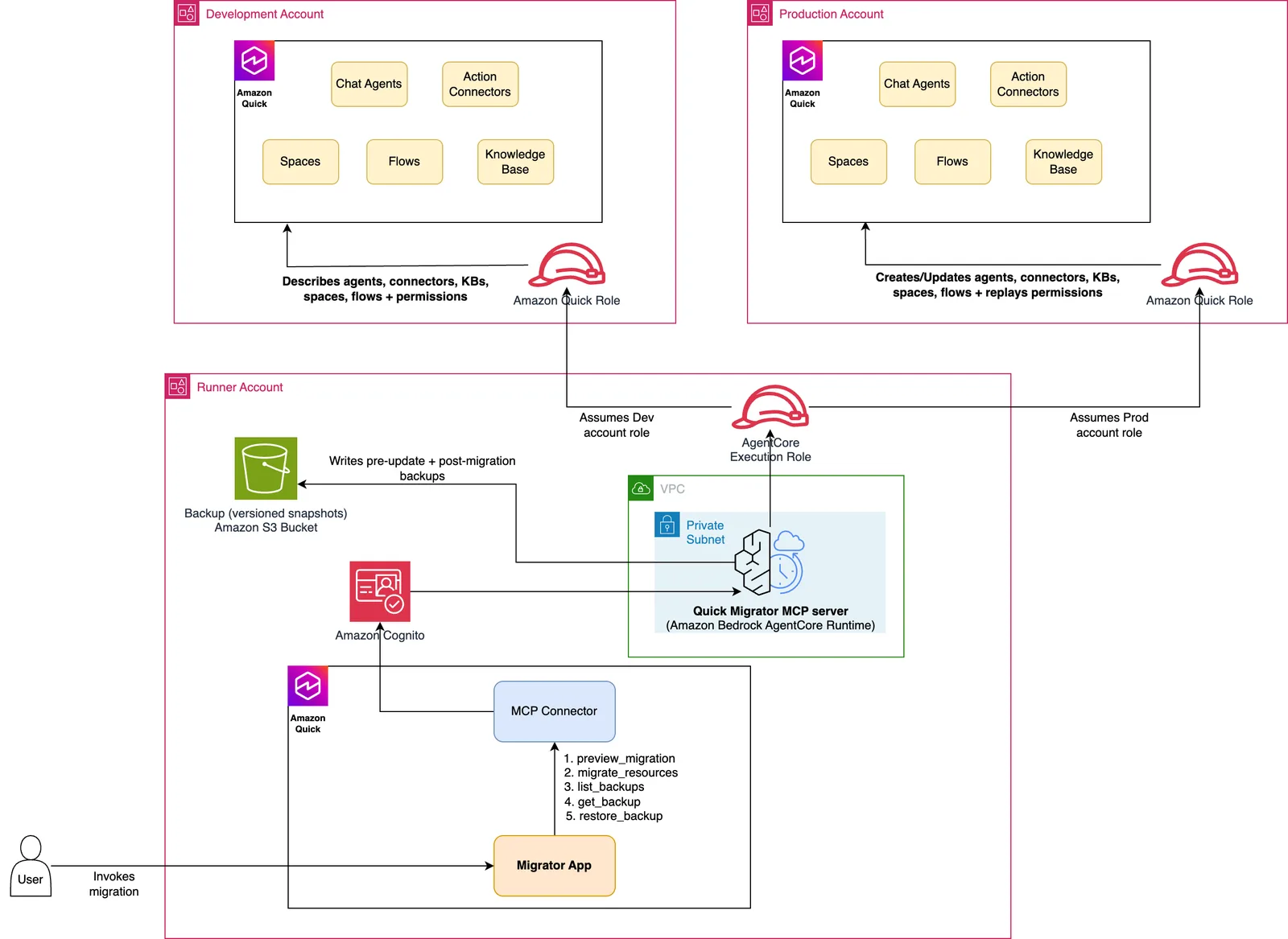
Three-account architecture: a runner account hosts the MCP server on Amazon Bedrock AgentCore and assumes roles into the source and target accounts. Image: AWS machine learning blog (original)
Amazon Quick now has a server that automates moving agent resources between AWS accounts. This tool uses the Model Context Protocol to recreate settings without manual work. It makes promoting chat agents, connectors, and knowledge bases safe and auditable. Teams can move their entire agentic solution from development to production in one step.
Previously, moving these resources required rebuilding everything by hand. Engineers had to recreate each agent with identical instructions and starter prompts. They also needed to re-attach action connectors and re-grant permissions manually. This process was slow and difficult to track for security teams. Errors could happen subtly when copying configurations across accounts.
The new server runs on Amazon Bedrock AgentCore. It acts as an idempotent, auditable MCP server for cross-account promotion. You select a resource type and pick specific items by ID or name. The system reads the source configuration and replays those actions in the target account. No resources are deleted during this process; only updates or creations happen.
The Amazon Quick Resource Migrator MCP server announcement
AWS released the Amazon Quick Resource Migrator as an MCP server on Amazon Bedrock AgentCore. This capability automates the promotion of Amazon Quick resources between AWS accounts. It replaces the old manual chore of recreating agents and connectors by hand. The tool is hosted in a central runner account that orchestrates the migration workflow.
You can use this server to move chat agents, action connectors, knowledge bases, flows, and spaces. The selection model allows you to pick resources by ID, name, or all items of a type. You might also migrate an entire space to bring its linked resources across with it. This resource-driven approach ensures nothing is missed during the cross-account move.
The server is designed to be safe because it never issues a delete command against the target. Every run only adds new resources or updates existing ones in place. This prevents accidental data loss when promoting configurations from a development environment. Teams can re-run the migration multiple times without creating duplicate entries.
Amazon Bedrock in AWS GovCloud now supports Claude Opus 5.5 and Claude Sonnet 5.5. These models hold FedRAMP Class D certification and DoD Impact Level 4 or 5 authorization.
How the three-account architecture works with roles and VPCs
The solution uses a specific three-account model to manage permissions securely. A central runner account hosts the MCP server on the Amazon Bedrock AgentCore runtime. This server assumes a read-only role in the source account for gathering configuration data. It also assumes a read-write role in the target account for applying changes.
AWS Security Token Service (STS) handles the identity between these accounts. No long-lived credentials are stored anywhere in the system. The runner account uses AWS STS to assume roles into both the source and target environments. This ensures that secrets remain encrypted and accessible only when needed.
The runtime authenticates callers using a Cognito JSON Web Token (JWT). It can run in virtual private cloud (VPC) network mode for extra isolation. A user pool, resource server, and machine-to-machine app client issue the JWT via a client-credentials grant. Callers present this token to AgentCore to authorize their requests.
Step-by-step migration logic for agents, connectors, and knowledge bases
The migrator promotes a chosen set of resources in a single tool call. It acts as an upsert operation where non-existent items are created. Existing items are updated in place without being removed first. Every update is protected by a versioned backup written to Amazon S3 before the change occurs.
Chat agents are recreated with their custom instructions, identity, tone, and starter prompts. Their action connectors are re-attached and remapped to the target account automatically. When a space is migrated, its agents are re-linked to it without manual intervention. The system restores agent-to-space linkage when the space itself is migrated.
Action connectors are recreated with their configuration but sanitized secrets. Secret values are never read from the source account during this process. Connectors are created with placeholder credentials and re-authenticated in the target environment. This prevents accidental exposure of sensitive data like API keys or passwords.
Knowledge bases are registered in the target account with a new data source. The migrator provisions the target bucket and its bucket policy for S3-backed bases. The documents themselves inside the S3 objects are not copied across accounts. Only the structure, permissions, and metadata move to the new location.
Flows are recreated in the target account from their definition files. Flow IDs differ across accounts so matching is done by name instead of ID. A same-named target flow is updated, otherwise a new one is created automatically. Flow permissions are copied to ensure access controls match the source configuration.
Spaces are recreated and re-linked to their agents, connectors, and knowledge bases. Resource Amazon Resource Names (ARNs) are remapped to the target account during this step. The migrator must migrate linked resources first so the target ARNs resolve correctly. Space permissions are copied after all dependencies are in place.
The five tools available for previewing and executing migrations
The server exposes five tools defined in the server.py file for managing the migration lifecycle. The preview_migration tool takes a source account ID, resource type, selector, and AWS Region. It returns an inventory of agents, connectors, knowledge bases, and flows that would be migrated. This acts as a dry run to confirm scope before making any changes.
You can pass a target account ID to the preview tool to see source-to-target mappings. The response marks each resource as either CREATE or UPDATE without executing anything. This supports a change-management approval step before the actual promotion happens. Teams can verify exactly what will change in the production environment.
The migrate_resources tool performs the full create-or-update migration described earlier. It takes source and target account IDs, resource type, selector, region, and environment names. It returns a structured report of everything it created, updated, or granted permissions for. Because it is idempotent, you can run it repeatedly on every release cycle.
The list_backups tool searches the backup catalog and lists available versions for each asset. Backups are pre-update snapshots written to a dedicated backup bucket by the migrator. One versioned object exists per update so you can see the full history for any resource. This allows teams to track changes over time without losing data.
The restore_backup tool re-applies a stored backup version onto the target resource. It updates an existing resource in place or recreates it if it no longer exists. The tool first takes a fresh pre-restore backup so the revert itself is reversible. This ensures you can always go back to a known good state if needed.
Safety features including versioned backups and reversible updates
Safe, reversible updates are a core feature of this cross-account promotion system. Before updating any existing target resource, the migrator writes a versioned snapshot to a dedicated backup bucket. If that backup cannot be written successfully, the entire update is aborted immediately. Every created or updated resource is also snapshotted for history tracking.
A restore tool can roll any resource back to an earlier version stored in the backup catalog. This protects against accidental misconfigurations during the migration process. The system ensures data integrity by keeping a full history of every change made. Teams can review logs and snapshots to understand what happened at any point.
Least privilege and isolation principles guide how roles and permissions are managed. The source role is read-only and only gathers configuration data for the migration. The target role holds only the specific actions the migration needs to perform. This limits the blast radius if a credential were compromised during use.
The runtime authenticates callers with a Cognito JSON Web Token (JWT). It can run in virtual private cloud (VPC) network mode for additional security isolation. These measures ensure that the migrator operates within strict boundaries defined by enterprise governance policies. Security teams can audit every action taken by the server without seeing raw secrets.
Why this matters for enterprise governance and release speed
Enterprise governance requires auditable changes that do not rely on manual recreation of resources. This tool replaces the error-prone chore of rebuilding agents and connectors by hand. It provides a repeatable workflow that logs every step for security teams to review. Compliance officers can verify that permissions were copied faithfully between accounts.
Release speed improves because teams no longer need to rebuild infrastructure after each validation cycle. The idempotent nature of the server means runs converge on the same state instead of producing duplicates. Engineers can deploy to production with confidence that the process is safe and predictable. This reduces the time spent on manual configuration tasks significantly.
Cost savings come from reducing human error and the need for duplicate resource creation. Teams avoid paying for resources they accidentally created during failed migration attempts. Automated workflows are cheaper than hiring extra staff to manage complex cross-account setups manually. The efficiency gains apply to both development and production environments.
Safety is enhanced because versioned backups prevent data loss during updates. If a change goes wrong, teams can roll back to the previous known good state instantly. This reduces downtime and minimizes the risk of service disruption for end users. Governance stories become stronger when every promotion is auditable and reversible.
What to do next with the source code and app builder
The full source code lives in the aws-samples repository on GitHub. Engineers can clone it to see the implementation details of the MCP server. Step-by-step deployment instructions are provided in the README file for setting up the environment. You deploy three AWS CloudFormation stacks to establish the necessary infrastructure layers.
At a high level, you deploy cross-account IAM roles and the VPC network first. Then you set up the Cognito-authenticated AgentCore runtime that hosts the MCP server. Finally, you register that runtime as an action connector in Amazon Quick for integration. This allows you to drive the migrator from Amazon Quick using natural language commands.
You can build a Quick App by pasting the ready-to-use app-builder prompt into the builder. The repository includes this prompt to create a point-and-click web experience layered on the same MCP tools. You do not need to build that UI by hand or write custom frontend code. The app builder handles the user interface logic automatically based on the available tools.
Check the aws-samples repository for the latest updates and documentation changes. Compare the server configuration against your own enterprise security policies before deployment. Try running the preview_migration tool in a test account to validate your specific use case first. Ensure you understand how ARNs are remapped to avoid linking issues with dependent resources.