Hi - I answer from the OpenSmartRoute documentation: routing, the API, plans and quotas, self-hosting. Ask away, or open a support ticket if you need a person.
Grounded in the docs - follow a source before acting on it.
Amazon Bedrock now offers agentic retrieval that plans sub-queries instead of using one search. LangChain packages expose both standard and new multi-step retrieval methods.
Key points
Agentic retrieval breaks questions into sub-queries for better evidence coverage.
The AgenticRetrieveStream API streams planning steps as trace events.
Standard retrieval uses a single vector to represent all question intents.
Boto3 version 1.43.32 is required to support agentic_retrieve_stream.
Why it matters: Agentic retrieval improves answer quality for complex questions by planning multiple searches.
By OpenSmartRoute editorial · written through the router by writer-small
From AWS machine learning blog - “Agentic retrieval with LangChain and Amazon Bedrock Knowledge Bases”
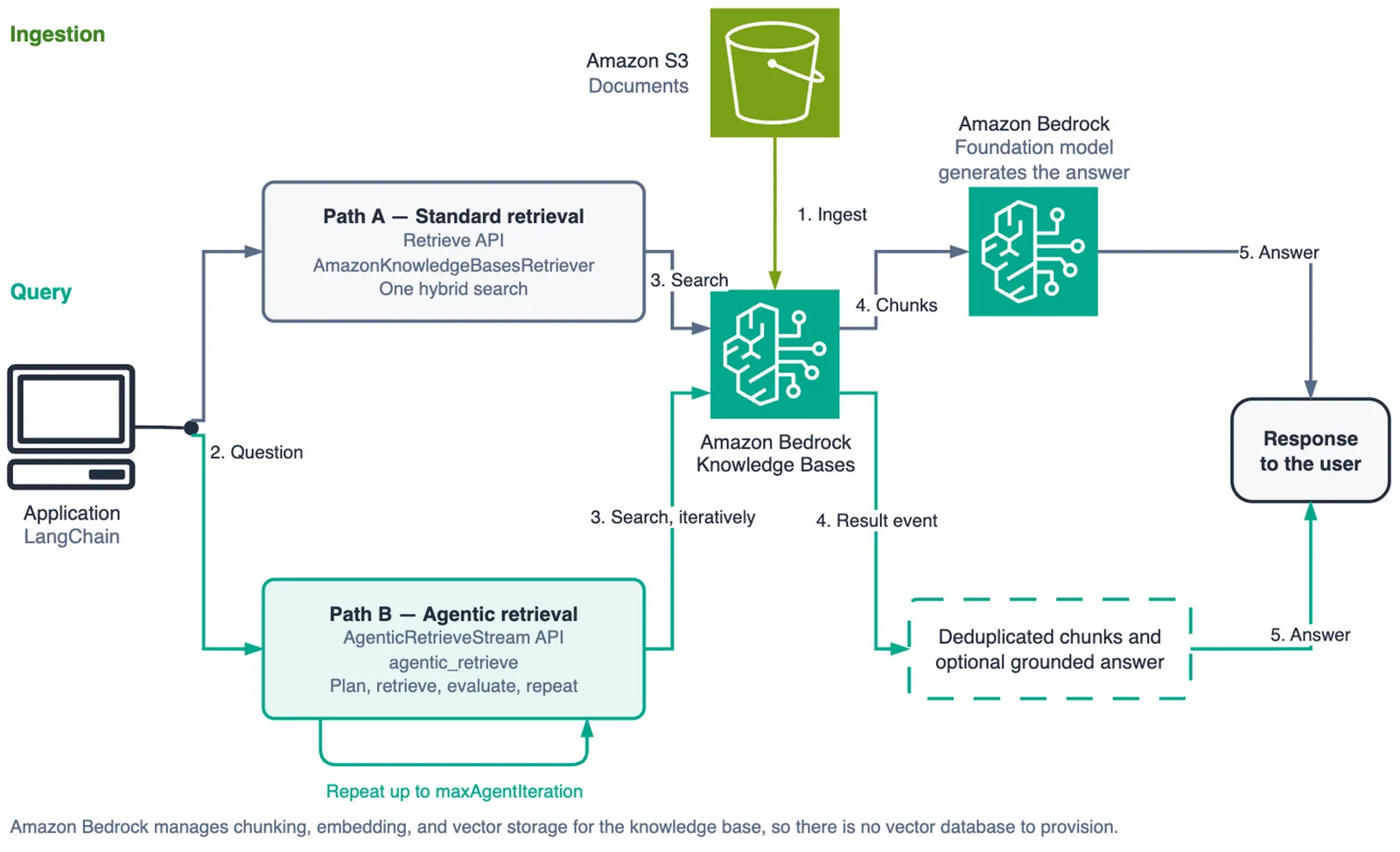
Application querying Amazon Bedrock Knowledge Bases through the Retrieve and AgenticRetrieveStream APIs to return document chunks and generate a grounded response. Image: AWS machine learning blog (original)
Amazon Bedrock adds agentic retrieval to Managed Knowledge Bases. LangChain packages now expose both standard and multi-step methods. This change lets applications plan sub-queries instead of using one search. A user asking about two products across three dimensions poses six questions. Standard similarity search uses a single query vector. The retriever generates an approximation of those intents. The resulting answer is concise and error-free. Relevance scores look reasonable on the surface. Retrieved chunks cover only a fraction of the question. They miss specific details required for a complete answer.
Agentic retrieval breaks the question into smaller sub-queries. It runs these sub-queries sequentially to gather evidence. The system judges whether it has enough information to answer. It searches again if the initial evidence is insufficient. This planning loop replaces the single-shot vector search approach. LangChain applications can now choose between standard and agentic paths. The langchain-aws package exposes both retrieval methods directly. Developers can switch strategies based on query complexity.
Amazon Bedrock Managed Knowledge Bases removes self-managed storage layers. It handles chunking, embedding, and storage entirely. Users configure a data source like Amazon S3 buckets. Amazon Bedrock manages the rest of the RAG architecture. This simplifies deployment compared to previous self-hosted setups. The service runs on specific AWS regions like US East. Engineers must check regional availability before deploying. Documentation confirms support for agentic retrieval in selected areas.
The Retrieve API runs a single hybrid search query. It returns scored document chunks immediately. The AgenticRetrieveStream API runs a planning loop instead. It streams steps back as trace events to the user. Standard retrieval fits into a synchronous LangChain chain easily. Agentic retrieval requires direct client access for full visibility. The langchain-aws helper hides the internal planning logic. It returns only the final chunks and an answer.
IAM permissions differ significantly between service roles and callers. A service role lets the knowledge base read documents. It needs s3:ListBucket and s3:GetObject permissions on your bucket. You must scope these permissions to specific knowledge base IDs. Another identity calls the APIs from your application. This identity uses AWS Security Token Service (STS). It requires bedrock:AgenticRetrieveStream permission for planning.
Amazon Bedrock in AWS GovCloud now supports Claude Opus 5.5 and Claude Sonnet 5.5. These models hold FedRAMP Class D certification and DoD Impact Level 4 or 5 authorization.
Knowledge Base Creation involves managing ingestion and embedding models. Setting embeddingModelType to MANAGED uses a service model. There is no storage configuration in the creation request. The API signals that Amazon Bedrock owns the storage layer. You attach an S3 bucket as the data source. Then you start an asynchronous ingestion job. Polling ensures the job reaches a terminal state.
Standard retrieval limitations stem from single-shot vector search. One embedding represents the entire question text. It cannot capture multiple distinct intents simultaneously. A complex query might have six separate questions hidden. Five chunks might be retrieved but miss two intents. At ten chunks, coverage improves but creates waste. Some sub-intents are covered twice unnecessarily. One chunk carries no relevant information at all.
Agentic retrieval plans loops to handle complex queries. The model reads the question and prior results. It emits sub-queries to target specific evidence. Retrieval fires once for each generated sub-query. FullDocumentExpansion appears when a passage lacks context. The planner iterates if the evidence is insufficient. This process continues until an answer is grounded.
Why it matters involves trade-offs between cost, speed, and quality. Standard retrieval is faster but misses complex intents. Agentic retrieval costs more due to multiple model calls. It trades latency for higher accuracy on multi-part questions. Production assistants often see simple single-intent queries. Reaching for a planning loop wastes money on those cases. Developers must choose the right tool for each query type.
What to do involves implementation steps for developers. Install Boto3 version 1.43.32 or later for support. Separate IAM identities for service roles and callers. Create a trust policy with specific account scopes. Scope knowledge-base permissions down to unique IDs. Use managedSearchConfiguration when setting up retrievers. Check regional availability before starting the experiment.
Developers should test standard retrieval first on simple queries. It is cheaper and faster for single-intent questions. Then test agentic retrieval on complex multi-part questions. Use agentic_retrieve_stream to observe the planning steps. This helps debug why a query failed silently. Monitor costs carefully as model calls increase with iterations. Delete resources when you finish the experiment to save money.
The trace events reveal exactly what the planner does. SpeculativeRetrieval runs before the first plan to cut latency. Planning emits sub-queries based on prior results. Retrieval fires for each sub-query generated by the model. FullDocumentExpansion happens when a chunk lacks enough context. You can see the step name and status in every event. This visibility is crucial for debugging agent behavior.
Agentic retrieval works only against Managed Knowledge Bases. It cannot be used with self-managed vector stores. The langchain-aws helper discards trace events by default. Direct client calls are needed to see the plan. You must set generateResponse to False for inspection. This avoids extra model call costs during debugging.
The service role needs specific permissions for S3 access. It cannot read documents without s3:GetObject rights. The wildcard character in resource ARNs limits scope. You should narrow it after creating the knowledge base. Another identity needs bedrock:InvokeModelWithResponseStream. This permission is required for generating grounded answers.
Ingestion jobs are asynchronous and take time to complete. Polling with a timeout prevents hanging indefinitely. Failure reasons appear in the job metadata object. Raise an error if the job does not finish successfully. The sample repository provides full error handling code. Copy that logic into your own production scripts.
Running this walkthrough incurs costs for storage and ingestion. Retrieval calls and foundation model inference also cost money. Check the Knowledge Bases pricing section for details. Delete resources immediately after completing the experiment. Do not leave knowledge bases running without use.
The diagram shows the solution architecture clearly. Both paths return document chunks from the knowledge base. The application uses these chunks to generate a response. Grounded responses rely on retrieved evidence quality. Agentic retrieval improves this quality for complex queries. Standard retrieval remains optimal for simple, fast tasks.
Developers can compare both methods side-by-side easily. Run the same query through standard and agentic paths. Measure latency, cost, and answer quality metrics. Use trace events to understand the planning process. This comparison helps decide when to use which method.
The langchain-aws package integrates these features seamlessly. It wraps the underlying Bedrock APIs for convenience. However, it hides some advanced configuration options. Direct client access provides more control over the process. Engineers need flexibility for custom agent workflows.
IAM permissions are critical for security and functionality. Misconfigured roles can cause API calls to fail silently. Check the trust policy for service role assumptions. Verify resource ARNs match your specific knowledge base IDs.
Embedding models affect how chunks are scored and retrieved. The managed model handles this automatically for you. Self-managed setups require configuring vector search parameters. Managed Knowledge Bases simplify this architectural decision.
Ingestion quality directly impacts retrieval accuracy later. Overlapping topics in the corpus help comparative questions. A single flat document cannot demonstrate query planning effectively. Ensure your data source has diverse, relevant documents.
The complexity of a query dictates the retrieval method needed. Simple queries benefit from speed and low cost. Complex queries need the planning loop for accuracy. Developers must analyze their typical user question patterns.
Cost optimization is key for production deployments. Standard retrieval saves money on simple tasks. Agentic retrieval adds cost but prevents hallucinations. Balance the budget against the risk of wrong answers.
Monitoring trace events helps identify performance bottlenecks. Look for steps that take too long to execute. Check if the planner iterates too many times. Adjust maxNumberOfResults limits based on your needs.
The US East region supports these features currently. Other regions may have different availability dates. Check AWS documentation for your specific deployment location. Plan for potential regional rollout delays in advance.
This update represents a significant step forward for RAG applications. It addresses the limitations of single-shot retrieval effectively. Multi-step planning provides a more robust solution. Engineers and managers can now make informed decisions. The technology is ready for production use today.
Announcement - Amazon Bedrock adds agentic retrieval with LangChain support
Amazon Bedrock launched agentic retrieval capabilities recently. This feature integrates directly with the LangChain framework. It allows applications to plan multi-step retrieval processes. The system breaks complex questions into smaller sub-queries automatically. Users can now retrieve documents based on a planned sequence of actions. Amazon Bedrock Managed Knowledge Bases supports this new functionality. The langchain-aws package exposes these APIs for easy integration. Developers can switch between standard and agentic modes seamlessly. This update targets the limitations of single-shot vector search methods. It aims to improve answer quality for complex user intents.
Architecture - How the Retrieve and AgenticRetrieveStream APIs differ
The Retrieve API executes a single hybrid search operation quickly. It returns scored document chunks in one request response. The AgenticRetrieveStream API runs a continuous planning loop instead. It streams retrieval steps back as trace events to the caller. This stream format lets engineers observe the model's internal logic. Standard retrieval acts like a simple lookup table query. Agentic retrieval functions more like a search engine with reasoning. Both paths ultimately return document chunks for generation. The architecture differs in how they handle query complexity.
IAM Setup - Required permissions for service roles and caller identities
Two distinct AWS Identity and Access Management (IAM) identities are required. One identity acts as a service role for the knowledge base itself. This role handles reading documents and calling embedding models internally. The second identity is an AWS Security Token Service (AWS STS) caller. This identity executes the actual retrieval API calls from applications. Separating these roles improves security and simplifies permission management. You must configure trust policies for the service role carefully. The trust policy must specify the exact source account ID. It prevents other accounts from assuming this role accidentally.
The IAM permissions for the service role include S3 access to your bucket. It needs s3:ListBucket and s3:GetObject actions on specific resources. These actions must be scoped to the knowledge base's resource ARN. You cannot use wildcards like * for the resource ARN here. The caller identity requires different permissions than the service role. It needs bedrock:AgenticRetrieveStream and bedrock:InvokeModelWithResponseStream actions. Standard retrieval needs bedrock:Retrieve and bedrock:GetDocumentContent actions. These permissions cannot be scoped to a specific knowledge base ARN easily.
A common mistake is missing bedrock:GetDocumentContent permissions. Agentic retrieval uses this action when expanding full documents. If you omit it, the planner fails when it tries to fetch context. You must include both Retrieve and GetDocumentContent in your policy. Guardrails require additional permissions like bedrock:ApplyGuardrail if active. Ensure your IAM policies cover all these specific actions correctly.
Knowledge Base Creation - Managing ingestion and embedding models
Creating a knowledge base involves selecting a data source for ingestion. This walkthrough uses Amazon Simple Storage Service (Amazon S3) as the primary source. You upload documents to an S3 bucket before starting the ingestion job. The system automatically chunks uploaded documents into smaller text segments. It then generates embeddings for each chunk using a configured model. Managed Knowledge Bases handle this entire pipeline without manual intervention. You do not need to manage vector stores or re-ranking models yourself.
Ingestion quality depends heavily on the diversity of your source documents. A corpus with overlapping topics supports comparative questions better. Single flat documents often fail to demonstrate query planning capabilities. Ensure your data includes varied subjects for robust testing results. The embedding model choice affects how chunks are scored and retrieved later. Amazon Bedrock selects a managed model by default for you. Self-managed setups require configuring specific vector search parameters manually.
Standard Retrieval - Limitations of single-shot vector search
Standard retrieval uses a single query vector to find relevant documents. It generates an average approximation of all user intents at once. This method executes fast and returns concise answers reliably. However, it often misses parts of the original complex question. The retrieved chunks cover only a fraction of what was asked. Relevance scores may look reasonable on the surface level. Users might still find gaps in the final generated response.
For example, comparing two products across three dimensions poses six simultaneous questions. A single search vector cannot capture all these distinct intents effectively. The retriever approximates the average intent rather than addressing each one. This limitation becomes critical when answering nuanced or multi-part queries. Engineers face hallucination risks when evidence is incomplete. Standard retrieval lacks the mechanism to seek additional context dynamically.
Agentic Retrieval - Planning loops and trace event observation
Agentic retrieval uses a planning loop to handle complex user requests. It breaks the main query into smaller sub-queries for processing. The model judges whether it has enough evidence after each step. If evidence is insufficient, it searches again with new parameters. This iterative process continues until a confident answer forms. Trace events stream these steps back to the application developer. Engineers can observe the planner's decision-making process in real time.
The trace events reveal how many iterations the planner performed. They show which documents were accessed and why. This visibility helps debug retrieval failures or unexpected behavior. Developers can adjust parameters like maxNumberOfResults based on logs. Understanding the loop logic prevents wasted API calls on simple queries. The system stops when it determines sufficient context exists for generation.
Why it matters - Trade-offs between cost, speed, and quality
Standard retrieval is cheaper and faster than agentic retrieval significantly. It avoids the overhead of planning loops and multiple search calls. Agentic retrieval costs more due to additional API requests and computations. However, it produces higher quality answers for complex questions. The trade-off depends on your specific user query patterns and budget constraints. Simple tasks benefit from the speed and low cost of standard retrieval. Complex tasks require the accuracy of agentic planning loops to avoid errors.
Managers must balance these factors when choosing a retrieval strategy. Overusing agentic retrieval on simple queries wastes money unnecessarily. Underusing it on complex queries risks poor customer satisfaction. Monitoring trace events helps identify which method performs best for your use case. Latency and cost metrics vary widely between the two approaches. Quality improvements in agentic mode often justify the extra expense.
What to do - Implementation steps for developers
Developers should run side-by-side comparisons of both retrieval methods immediately. Use the same query through standard and agentic paths to measure differences. Track latency, total cost, and answer quality metrics carefully. Review trace events to understand the planning process for each run. This empirical data guides decisions on which method to deploy where.
Start by setting up IAM roles with the correct permissions described earlier. Verify trust policies and resource ARNs match your specific knowledge base IDs. Create a test corpus with documents covering overlapping topics. Run ingestion jobs to populate the knowledge base with sample data.
Integrate both APIs into your LangChain application using the langchain-aws package. Wrap the Retrieve API for standard queries and AgenticRetrieveStream for complex ones. Monitor costs per query to establish baseline budgets for production use. Adjust maxNumberOfResults limits based on observed planner behavior in traces.
Plan for regional availability delays if deploying outside US East (N. Virginia). Check AWS documentation regularly for updates on feature rollout dates. Document your findings from the side-by-side tests for team review. Share insights with stakeholders about cost savings or quality gains achieved.