Hi - I answer from the OpenSmartRoute documentation: routing, the API, plans and quotas, self-hosting. Ask away, or open a support ticket if you need a person.
Grounded in the docs - follow a source before acting on it.
Add web search to Claude Desktop using Amazon Bedrock AgentCore - OpenSmartRoute
Add web search to Claude Desktop using Amazon Bedrock AgentCore
This article explains how to connect Claude Desktop to web search via Amazon Bedrock AgentCore, enabling real-time information retrieval securely within AWS.
Key points
Web Search is available in US East, Europe, and Asia Pacific regions.
Uses JWT-based inbound authentication with Amazon Cognito.
Integrates with AWS IAM Identity Center for enterprise SSO.
Supports secure, no external API keys, web search within AWS infrastructure.
Why it matters: Enables real-time web data retrieval, improving response accuracy and timeliness for AI agents and models.
By OpenSmartRoute editorial · written through the router by llm-small
From AWS machine learning blog - “Add secure Web Search to Claude Desktop with Amazon Bedrock AgentCore”
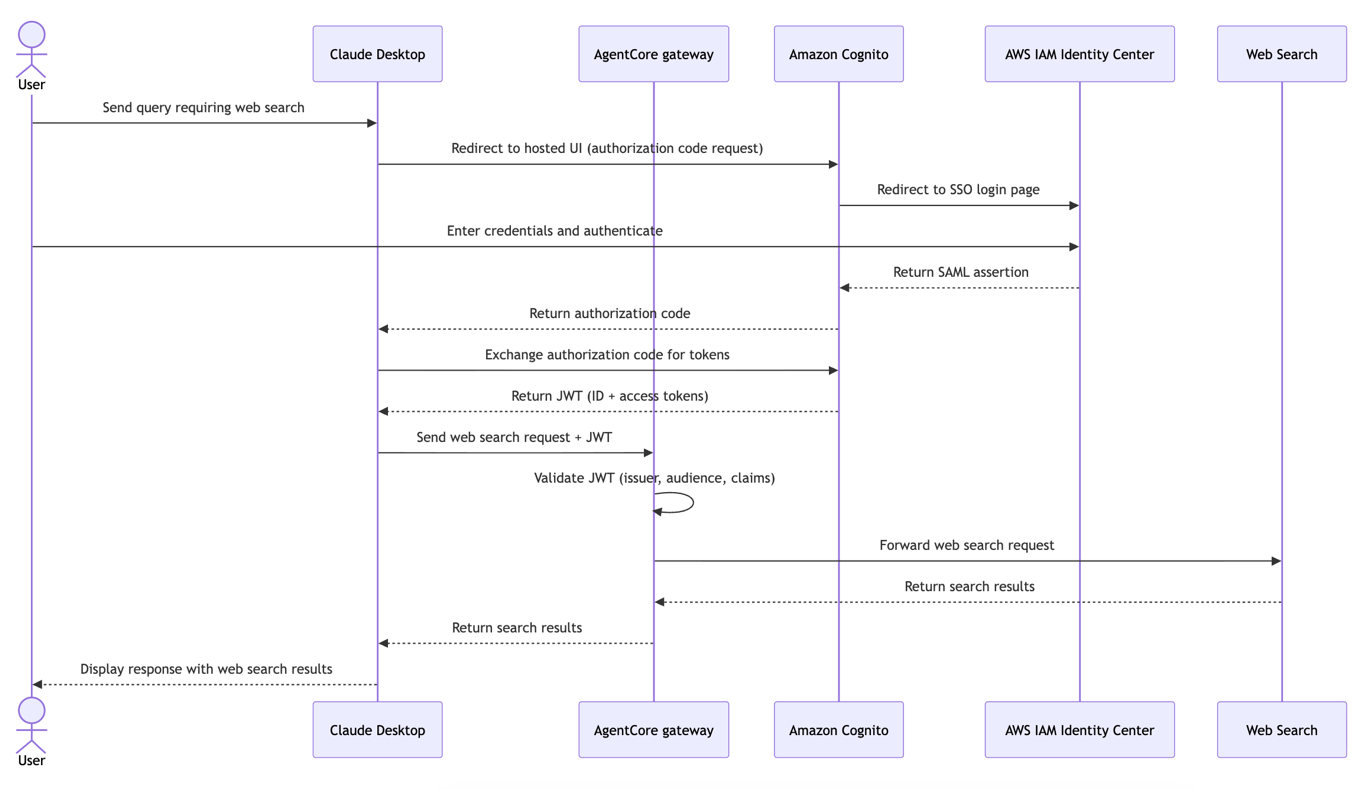
Sequence diagram of the authentication flow between Claude Desktop, IAM Identity Center, Amazon Cognito, and the AgentCore Gateway. Image: AWS machine learning blog (original)
Introduction - Overview of adding web search to Claude Desktop with Amazon Bedrock
Adding web search to Claude Desktop allows the AI to access real-time information from the internet. Without this feature, responses are limited to what the model learned during training. This means it cannot provide updates on recent events, prices, or documentation. Connecting Claude Desktop to web search makes it more useful for current data.
Amazon Bedrock AgentCore is a platform that helps build and connect AI agents at scale. It supports any framework or model, making it flexible for different needs. With AgentCore Gateway, users can link Claude Desktop to a managed web search service. This setup keeps all query traffic within Amazon Web Services (AWS) infrastructure, ensuring security and control.
The web search capability uses a managed, Model Context Protocol (MCP)-compatible web index. It covers tens of billions of documents from the internet. This means the AI can retrieve current information securely, without exposing queries outside AWS. The integration process involves setting up authentication, configuring the gateway, and connecting it to Claude Desktop.
This process benefits organizations that want to keep their data within AWS. It also simplifies managing security and access. The steps include creating identity providers, setting up OAuth flows, and configuring the agent gateway. Once completed, Claude Desktop can automatically query the web search tool when needed.
Adding web search enhances the AI’s usefulness for tasks requiring up-to-date information. It replaces the need for external APIs or manual searches. Instead, the AI can retrieve data directly through a secure connection. This makes responses more accurate and timely, especially for recent news, prices, or technical updates.
What is Amazon Bedrock AgentCore - Platform for building and connecting AI agents
Amazon Bedrock AgentCore is a platform designed to help build, connect, and manage AI agents. It supports creating agents that can perform specific tasks or connect to various data sources. The platform works with different AI frameworks and models, giving users flexibility.
Google launched EmbeddingGemma 2, a compact open model that handles text, code, images, video, and audio. It uses a single shared vector space to enable unified search across all media types.
AgentCore provides tools to develop agents that can operate at scale. It allows connecting multiple agents or tools to work together. This makes it easier to build complex AI systems that can handle large workloads. The platform also offers a way to optimize agents for better performance and security.
A key feature of AgentCore is the Gateway, which acts as a bridge between AI models and external tools or data sources. Gateways can be configured with different capabilities, such as web search or document retrieval. They handle authentication, authorization, and data flow, making integration seamless.
The platform is designed to keep all traffic within AWS infrastructure. This enhances security by avoiding external API keys and limiting data exposure. It also simplifies management by providing a centralized control point for all connected agents and tools. Organizations can use AgentCore to extend their AI capabilities securely.
In practice, users can create custom agents for specific tasks, such as customer support, data analysis, or web search. These agents can be deployed at scale, with security and performance optimized for enterprise needs. Amazon Bedrock AgentCore supports a variety of use cases, from simple automation to complex AI workflows.
Web Search capability - Managed, MCP-compatible web index with tens of billions of documents
The web search feature in Amazon Bedrock AgentCore is a fully managed service. It is compatible with the Model Context Protocol (MCP), a standard for connecting AI models with external tools. MCP compatibility means the web search can be easily integrated with different AI systems.
This web index covers tens of billions of documents from the internet. It is designed to provide comprehensive and current information. The index is managed by Amazon, ensuring it is scalable and reliable. It can handle large volumes of queries without performance issues.
Queries sent to the web search are processed within AWS infrastructure. This keeps all data secure and private. There are no external API keys to manage, and no queries leave the AWS boundary. This setup reduces security risks and simplifies compliance with organizational policies.
The web search tool can be used by any agent connected through AgentCore Gateway. It is configured to respond quickly and accurately to search requests. The service is suitable for applications that need real-time data, such as news updates, product prices, or technical documentation.
The web index is continuously updated and maintained by Amazon. This ensures the search results remain relevant and current. Organizations can rely on this service to provide accurate information without building their own web crawlers or search engines.
Authentication setup - Using AWS IAM Identity Center, Amazon Cognito, and JWT
Securing access to the web search service involves multiple authentication layers. The process starts with AWS Identity and Access Management (IAM) Identity Center, which manages user identities for organizations. IAM Identity Center supports single sign-on (SSO), allowing users to access AWS resources with their organizational credentials.
The setup uses Security Assertion Markup Language (SAML), a standard for exchanging authentication data. IAM Identity Center authenticates users via SAML and then passes this information to Amazon Cognito. Cognito acts as a federation layer, issuing JSON Web Tokens (JWTs) that confirm user identity.
JWTs are compact, URL-safe tokens that contain user information and access permissions. The AgentCore Gateway validates these tokens on each request. This ensures only authorized users can access the web search tool. All authentication traffic stays within AWS, maintaining security and compliance.
This layered approach simplifies user management. It leverages existing organizational identities, avoiding the need for separate credentials. It also ensures that access to the web search is tightly controlled and auditable. The entire process is designed to be scalable and secure for enterprise environments.
The authentication flow begins with users signing in through their organization's SSO portal. They are then federated to Cognito, which issues a JWT. The JWT is used by the Gateway to verify the user's identity before allowing access to web search. This chain keeps the process within AWS boundaries.
Creating Cognito user pool - Setting up the token issuer for secure access
Creating an Amazon Cognito user pool is the first step in establishing a secure token issuer. The user pool manages user identities and issues tokens used for authentication. It acts as the OpenID Connect (OIDC) provider for the AgentCore Gateway.
The user pool is configured with a name and schema. The schema defines user attributes, such as email, which is required and mutable. Once created, the user pool provides a unique ID that identifies it within AWS. This ID is used in subsequent configuration steps.
A domain must be created for the user pool. The domain name must be globally unique across AWS. It is used as the URL endpoint for authentication and token issuance. The domain URL is also used in configuring OAuth flows and integrations.
The user pool domain supports OAuth 2.0, a protocol for authorization. It enables secure token exchange between the user, Cognito, and the application. The domain URL will be used in the OAuth authorization process, allowing users to sign in and receive JWTs.
This setup provides a trusted source for user tokens. It ensures that only authenticated users from the organization can access the web search service. The user pool also supports attribute mappings, which link user data from SAML to Cognito attributes.
Configuring IAM Identity Center SAML application - Federation with Cognito for enterprise login
To enable enterprise login, a SAML application must be configured in IAM Identity Center. This application federates with the Cognito user pool, allowing users to authenticate using their organizational credentials.
The process involves creating a new SAML application in the AWS management account. The application is set up with a metadata URL or file, which contains the identity provider's details. The ACS (Assertion Consumer Service) URL points to the Cognito domain created earlier.
The metadata XML file is downloaded from the SAML provider and uploaded to Cognito. This file contains information about the identity provider, such as certificates and endpoints. It enables secure communication between IAM Identity Center and Cognito.
Attribute mappings are then configured within the SAML application. The subject attribute, which identifies the user, is set to a persistent format. This ensures consistent user identification across sessions. Users or groups are assigned access to the web search feature through this application.
Once the SAML application is configured, IAM Identity Center can federate user identities to Cognito. Users can then log in with their enterprise credentials, and Cognito issues JWTs based on the SAML assertions. This setup aligns with organizational identity governance policies.
The federation process ensures that user access is controlled and auditable. It also simplifies onboarding and management by leveraging existing identity systems. The entire flow remains within AWS, maintaining security and compliance.
Creating Cognito app client - OAuth flow for user authentication and JWT issuance
Creating an Amazon Cognito app client is essential for enabling OAuth-based authentication. The app client is configured with a name, supported identity providers, and callback URLs. It facilitates the OAuth 2.0 authorization code flow, which is used to authenticate users and issue JWTs.
The app client supports the IAM Identity Center as an identity provider. It is configured with callback URLs, which are endpoints where users are redirected after login. These URLs are typically local or cloud-based addresses used during development or production.
Scopes such as "openid," "email," and "profile" are enabled. These scopes specify the information included in the JWTs issued by Cognito. The OAuth flow allows users to authenticate securely and receive tokens containing their identity data.
The client ID and secret are generated during this process. These credentials are used by Claude Desktop to initiate the OAuth flow. When a user logs in, the client exchanges authorization codes for JWTs, which are then used to access the web search service.
This setup ensures secure, standardized user authentication. It also allows integration with existing identity systems and simplifies token management. The OAuth flow provides a seamless login experience for users and a secure way to verify their identity.
Setting up AgentCore Gateway with Web Search tool - Configuring with JWT inbound auth and Web Search target
Configuring the AgentCore Gateway involves creating a gateway with inbound authentication based on JWTs. The setup uses the Cognito user pool ID and app client ID to validate incoming tokens. This ensures only authorized users can access the web search feature.
A Python script can be used to create the gateway, replacing placeholders with actual environment values. The script sets the region, account ID, and other parameters. It creates an IAM role with permissions to invoke web search and other necessary actions.
The role's trust policy allows the Gateway service to assume it. Inline policies specify permissions for actions like getting the gateway, invoking web search, and managing configurations. These permissions are scoped to the specific account and resources.
Once the role is created, the script creates the gateway itself. The gateway is configured with a description, role ARN, and URL. After creation, the script waits for the gateway to reach a "READY" status. This ensures it is fully operational before proceeding.
The next step attaches the web search connector target to the gateway. This target is a managed connector that handles web search queries. The configuration includes the connector ID and parameters. The setup completes with the Gateway ready to handle authenticated web search requests.
This configuration enables secure, scalable web search integration. It ensures only authenticated users can invoke web search through the Gateway. The setup supports enterprise security policies and simplifies management.
Using Web Search in Claude Desktop - Connecting, authenticating, and querying web data
With the Gateway configured, Claude Desktop can connect to the web search tool. The connection involves entering the Gateway URL, client ID, and client secret into the configuration window. The authorization server URL is also specified.
Once connected, users authenticate through their organization's SSO portal. The process redirects to the AWS Cognito login page, where credentials are entered. Successful login completes the authorization, and Claude Desktop receives a token to access web search.
After setup, Claude Desktop automatically discovers the Web Search tool via MCP. When a user asks for current information, the model invokes the web search tool. A prompt appears asking for permission to run the search query.
The user can approve or deny the request. If approved, the web search runs securely within AWS. Results are retrieved and included in the model's response. This process makes responses more accurate and timely, especially for recent data.
The integration allows for seamless, secure web access within Claude Desktop. It enhances the AI’s ability to provide up-to-date information without external API keys or data leaving AWS. Users can now get current news, prices, or technical updates directly through the AI.
To remove the setup, resources such as the gateway, roles, and user pools can be deleted using AWS CLI commands. The process ensures clean removal of all components created during the setup.
In the IAM Identity Center console, the SAML application can also be deleted to complete the cleanup. This maintains organizational security policies and prevents unauthorized access.
This setup demonstrates how organizations can extend their AI capabilities with secure, enterprise-managed web search. It leverages AWS services to keep data within organizational boundaries while providing real-time information access.
Google launched EmbeddingGemma 2, a compact open-weight model that maps text, images, and audio into one vector space. It runs locally on phones with minimal RAM and enables instant on-device semantic search.